How to SEO your Ecommerce category pages
Category pages can be a tricky type of page to optimise for e-commerce SEO as they often contain little content. However, if written and used in the right way, category pages can represent a great opportunity for e-commerce sites to rank for a wider range of keywords and get more traffic.
Why are category pages important?
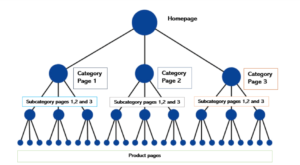
It’s important for SEO purposes that your content isn’t hidden too many layers deep in your hierarchical structure. Ideally your category pages should not go more than 3 levels deep for ease of accessibility by the user, and to pass on the link value. The higher the page, the stronger the link juice. This would mean that your second most important pages should ideally be your category pages.
Also many e-commerce sites are unable to rank for individual pages as the specific keywords are too competitive, or because people don’t search for individual product names. So category pages are a good way to achieve higher rankings and having them optimised for more general terms is a great approach.
How do you optimise category pages for SEO?
So if category pages are important for e-commerce sites, let’s look at the best approach for making them optimised for search engines and users.
Category page content
The main concerns with category pages is knowing how many to have, how granular to go in the categories and how to get enough content on the page to get some traction from the search engines. One way to do this is to add a paragraph at the top of your page to explain what the category is. This paragraph should include your target keywords and should be fully optimised for SEO.
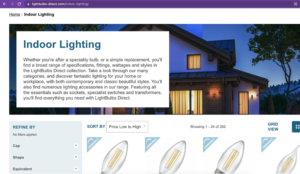
An example of a paragraph about a subcategory at the top of a page
Category page URLs
The main rule with category URLs is that they should be logical and easy to read. So keep your URLs short and to the point, so a user can tell what a category is from the URL alone.
A good example of URLs for lightbulb categories are:
- https://www.lightbulbs-direct.com/outdoor-lighting/
- https://www.lightbulbs-direct.com/indoor-lighting/
If you use a plugin like WooCommerce to manage your e-commerce pages, there are settings where you can configure the automation of the URL slugs based on categories and subcategories.
Category page headings
The main header (H1) of your page should emphasize the main keyword and reinforce the title tags’ theme. It’s good to use an entire keyword phrase rather than just a word, to help you stand out from competitors. This sends a stronger signal to search engines that this section is about your full keyword phrase.
For example the H1 of an indoor lighting category would be:
<h1>Indoor Lighting</h1>
Category page meta content
As the title tag is the most influential on page element, and your meta description influences how many people will click through to the page, you should make sure that both your titles and descriptions are optimised for SEO.
For example a H1 for a category page could be:
<title>Indoor Lighting | Lightbulbs Direct</title>
And your meta description could be:
<meta name=”description” content=”Indoor lighting fittings with both contemporary and classic beautiful styles. Featuring all essentials such as lamp shades, pendants and ornamental lighting.”>
A meta description is also a great place to summarise your products and offerings like free shipping and free returns, but make sure this is written in a normal way, and avoid spammy descriptions with a list of bullet points.
Beware of canonicals if you want the category page to rank
One strategy some e-commerce sites use with category pages is to canonicalise the lower level pages. For example if there was a category called ‘Trainers’, then all sub-category pages like ‘Running trainers’ or ‘Walking trainers’ would have canonical tags on them, telling Google to ignore these pages and instead only rank the higher level ‘Trainers’ category page.
This could be a mistake as if you set up your pages this way, you won’t be giving your sub-category pages a chance to be indexed by search engines, and rank for the more targeted search terms.
A good use of canonical tags however, is if you have a category page with products across multiple pages. You should canonicalise all of the secondary pages to the primary. For example, the URLs might be:
- Primary page: https://www.next.co.uk/shop/category-bags-colour-black/1
- Canonicalised page: https://www.next.co.uk/shop/category-bags-colour-black/2
- Canonicalised page: https://www.next.co.uk/shop/category-bags-colour-black/3
For a full guide on what canonicals are and how to use them, check out our blog.
Conclusion
Category pages are a great opportunity to rank for some more specific search terms and help users find the products they’re looking for. However they must be structured in the right way, optimised for SEO, and include the right content for users and the search engines.