Guide to the Yoast SEO Plugin
With the recent announcement that the Yoast SEO WordPress plugin is coming to Shopify, now is a great time to familiarise yourself with one of the world’s most popular plugins, understand what it does, and consider if it’s something you should use on your ecommerce website.
What is the Yoast SEO Plugin?
Yoast SEO is a plugin, originally created back in 2010 for WordPress CMS, that allows you to manage your websites’ search engine optimisation efforts from within your content management system. Yoast is one of the world’s most popular SEO plugins, with over 5 million active installations.
Why use an SEO plugin?
The advantage of using a plugin is that it enables you to automate a lot of your search engine optimisation tasks, meaning you can consistently maintain pages and roll out optimisations with very little effort.
SEO plugins also simplify a lot of the processes of adding SEO elements to pages, which makes it easy for users with little SEO knowledge to add the correct elements to a page, as well as allowing them to follow a template when unsure where certain things go.
Some of the tasks an SEO plugin can help you automate include adding breadcrumbs to a page, adding canonical URLs, adding custom meta titles, descriptions and keywords, greeting XML sitemaps, adding .txt and .htaccess files, as well as integrating with other SEO tools like Google Search Console and Google Tag Manager.
What CMS’ does it work with?
Currently Yoast SEO is only available on WordPress, however this month Yoast.com announced that the plug-in will be available for Shopify too. Shopify is a popular content management system for e-commerce sites and will no doubt be a huge benefit to e-commerce companies who struggle to maintain good SEO standards across large quantities of product pages and category pages.
Is the Yoast SEO plugin free?
The Yoast SEO plugin comes with a free version and a premium, paid for version. The free version includes many of its great features, however if you’re happy to pay the 99EUR per year, the premium version allows for more intelligent optimisation, additional tools and features, and the company offers 24/7 support. So depending on the size of your business, you can try the free version or invest in the premium.
How does Yoast SEO work?
The Yoast plugin allows you to both optimise individual pages, as well as make site wide improvements and manage the technical aspects of your website.
Once you’ve installed the Yoast SEO plugin, you will see a new menu item in your WordPress panel, which will allow you to access all the settings and features.
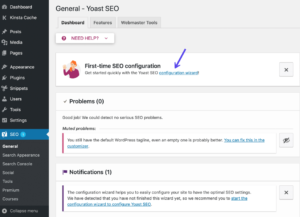
(Source: https://kinsta.com/blog/yoast-seo/)
Yoast for technical SEO
The plugin offers guidance on the following technical aspects of your site:
- It creates an XML sitemap
- It allows you to create a txt file
- It allows you to edit and create site-level Schema structured data
The plugin also helps with the following:
- The creation and implementation of canonical tags where needed: everytime you create a page that should be indexed, Yoast will create a canonical for this page, without you needing to do a thing.
- The management of redirects: any time you change an existing URL or delete a page from your site, Yoast will notify you to set up a redirect.
- The creation and management of internal links: the Yoast link counter allows you to keep track of how many internal and external links there are on a page. This will help you create a healthy interlinking strategy in no time.
Yoast for on page optimisations
For each page on your website, you can add in your page’s target keyphrase and the Yoast plugin will help you optimise that page for the target keyphrase. It will add suggestions of whether you’re using the keyphrase enough across the copy, it will prompt you to add it to the H1, meta title, description and alt tags, and it will check if you’ve used any internal links.
It will also offer a summary of recommendations and analysis in green, orange and red, based on how your pages scores for SEO and what you could do to improve your rankings.
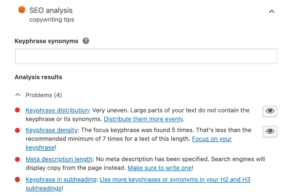
An example of the YoastSEO copywriting tool – source: www.yoast.com
The Yoast SEO plugin also allows you to manage how your pages will look in the search results. You can write custom meta titles, meta descriptions and URL slugs, and see how they will look on the SERP, so you can customise the length and appearance for both desktop and mobile search results.
The plug in also checks the readability of your content – analysing whether the tone of voice is right, if sentences are too long or short, and if the use of your target keyword is natural, or overused. Like the keyphase assistant, the readability tool gives you feedback in green, orange and red and tells you what you’re doing right, and where you could improve.
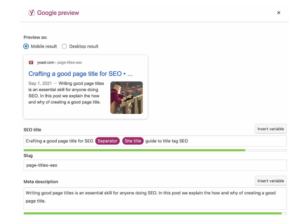
Yoast also allows you to manage what Google will show in search results – source: www.yoast.com
Overall the Yoast SEO plugin is a great help to most ecommerce sites and CMS users as it simplifies processes, automates tasks, and helps you cover every aspect of SEO you might need for your website. It also comes in a free and paid for version, and with it being rolled out to Shopify this year, many more ecommerce businesses can take advantage of this great tool to help with your SEO needs.
If you would like to know more about Yoast SEO, or help setting it up and using it, get in touch with one of our SEO consultants today.