Deep dive into Featured Snippets
Google launched featured snippets in January 2014. Since then a lot has changed: they went from an unknown to one of the strongest signals of how Google interprets a search query. Ranking in the infamous position zero has become one of the most important tasks of SEO specialists. In this guide we’re going to take a deep dive into featured snippets and how you can incorporate them into your SEO strategy.
What are featured snippets?
A featured snippet is a piece of content that appears on the SERP (search engine results page) that Google has extracted from a web page. Featured snippets come in many different formats. They are used by Google to best answer a question or query, by exposing the content on the SERP itself, so the user can quickly get the information they are looking for.
Why are featured snippets good?
Featured snippets have evolved over time. When they first came onto the scene in 2014, featured snippets were always in position zero, which is the top of the organic results on the SERP but the original result it came from would still rank on the SERP, further down. So a website could rank both in position 0 and position 4 on the same page. This was a highly coveted opportunity among SEO specialists.
In 2020, Google changed this slightly and announced that Featured snippets would no longer be duplicated further down the page. So if you get the snippet, this will be your only ranking in the results. This affected how SEO tools tracked rankings as previously, position 0 was not counted as a ranking position so it would be invisible. However tools like SEMRush and STAT have adapted to take into account the change and count a featured snippet as a standard organic result.
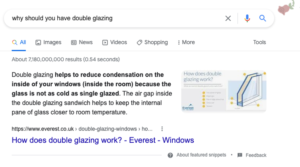
Example of a paragraph featured snippet
Despite this change, getting your content into a featured snippet slot is still extremely valuable. Not only does it push your content higher up in the search results, but it also makes your content stand out on the SERP. Stats show that results in featured snippets get a much higher click through rate than standard organic results.
Featured snippets are also useful for SEO specialists as they help us understand how Google is interpreting search queries. As we know, Google’s search algorithm is getting smarter by the day, and is now able to understand search intent and nuances. With the introduction of rankbrain in 2015, allowing Google to understand the concept of context and topics, the search results have been getting more and more relevant. So the more we can understand what Google is thinking, the better we can optimise our content for its purposes.
.
Most popular types of featured snippets
There are many types of featured snippet formats. According to STAT, the most popular format of featured snippets in 2021 was the paragraph, making up just under 70% of snippets on desktop computers. The next largest format type was list. Tables and videos were slightly more popular on mobile than desktop which is something users should bear in mind when looking into opportunities.
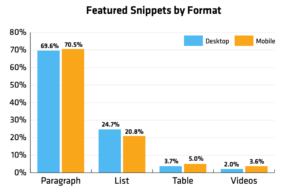
(source: https://getstat.com/featured-snippets-report/)
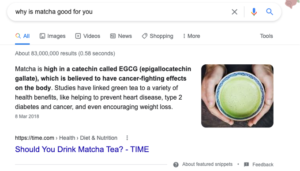
The most popular search queries that trigger featured snippets are ones that answer questions starting with ‘Who, what, where and why’, as these are all easily answered with a snippet of information that can be shown on the SERP. Why was the most popular and triggered the most paragraph format featured snippets. According to STAT, 70% of “why” questions showed a featured snippet in their results.
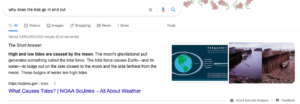
Example of ‘why’ question triggering a featured snippet
There are four main types of featured snippets which include:
Paragraph
This is the most popular snippet format, and as the name suggests, is a short paragraph of text that provides information that answers the user’s query. It is most commonly shown to answer ‘why’ questions.
Lists
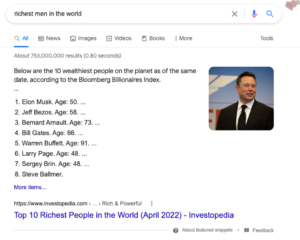
A list is another form of snippet that is shown when the user is trying to find a list of things. Search queries like ‘richest men in the world’ or ‘companies that offer CDNs’ or ‘countries that drive on the left’ would all trigger this kind of snippet.
Tables
Tables are a form of featured snippet that show sets of data in a table format. They could include things like sports results, prices for products, earnings of companies or scientific information.
Videos
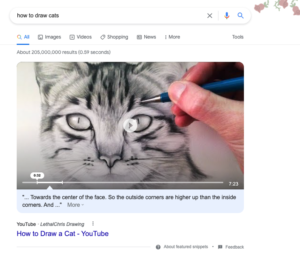
Youtube is the most popular video platform, so it’s no surprise that snippets from Youtube can now be visible on Google’s SERP. Video features are especially popular with the ‘how to’ query.
There are other results on the SERP that are not officially featured snippets, but these include:
- Rich answers → also known as instant answers, these are a quick answer to a question. For example ‘How old is Leonardo DiCaprio’ and the result would be ‘47 years’.

- Rich Snippets → a rich snippet is an enhanced version of an organic search result. As well as a meta title and description, search results enhanced with rich snippets could also show ratings, sitelinks, breadcrumbs and question/answers. To learn more about rich snippets, check out our blog on the 3 most useful schema types for SEO.
- Knowledge graph → this is an information that often appears on the right hand side of the screen showing the user information about a company or person. A company can edit this themselves but Google can also pull the information from a resource like Wikipedia. It is recommended to organisations to claim their knowledge graph and ensure that the information on it is accurate and up to date.
How to get featured in a snippet
In short, if you want to appear in a featured snippet slot for a keyword, you should first of all check if the featured snippet exists. Then you should research what is already showing in position zero. Have a look at how Google understands the result, what it is showing and what kind of content it is.
Once you have assessed the opportunity and the competition, you should first ensure that your organic result is on page 1 of the SERP. Anything past page 1 has a very low change of getting the featured snippet spot. So if you’re not on page one, you need to start by getting there.
If you are on page one, tweak your content to answer the user’s question, use an exact match version of the keyword on your page. Answer the question in a short paragraph if you’re trying to get a paragraph snippet. Create a table if you want a table. Make sure your content is suitable for the snippet format you’re trying to achieve. And work on your domain authority and backlinks, to give your page event more value in the eyes of Google.
Where to track your performance on featured snippets
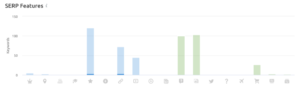
There are two ways to track your featured snippets. The first is to use a range of SEO tracking tools, for example SEMrush, Ahrefs and Rank Rangers. All of these tools provide reports that allow you to see if you are appearing in the featured snippets available for your target keywords. Most will also let you know IF there is a featured snippet opportunity for your keywords and what type it is.
The second way to track your featured snippet performance is to do a manual check. If you have a list of priority 1 keywords that you want to rank for or you have optimised for, you can manually type in the search queries and see if your content is being featured.